Showing posts with label Mac. Show all posts
0 com

What About This? (app idea)

What about this; what if someone were to make an iPhone/iPad/iPodTouch app that was a browser. Just a very simple browser. With one extra feature. It would detect if a page was in a sequence or had a next link and would allow the user to swipe to the auto-loaded next page.

In my brain this seems simple. Simply search the site for a text link that says "next" and autoload the page for that link. If no "next" exists, check to see if the page number can be increased sequentially. If neither of those exist, allow the user to designate what the "next" button looks like, weither it be an image (which the app could then search the next page for),


or a different word (ditto),

or even a location on the page that stays the same (ditto again).

The app (at least for me) could be a way to read through a lot of webcomic archives without a lot of stress. It could keep track of where you are in the archives, provide the (seemingly required) post to Twitter, email, or Facebook buttons. It might even have a public catalogue of webcomics that the user could add to as they read the comics. (Maybe with tags, descriptions, whatever else).Just a thought.
0 com

Apple just saved me three hundred dollars.

Apple just saved me three hundred dollars.

I was going to get a brand new iPod Touch yesterday; video camera, five megapixel camera, Facetime as a bonus. But now I discover that the camera only takes pictures at 960 x 720. That's .7 megapixels. Not worth it. So I get to keep my three hundred dollars with the added bonus of some deflated hopes and dreams.
0 com

Apple Streaming

I've read a lot of blogs expressing suprise over Apple's decision to live-stream the September keynote. But I think I know why Apple did so. What was it that Jobs got mad about at the last keynote? His slow internet.

If you can watch the keynote live from Apple, you won't read the live blogs from the event. If you don't read them, they won't do them. If they don't do them, they don't need their own internet at the event.

Result? Jobs has better internet.
0 com

iDream of Apple

    You wake up in the morning to the sound of your alarm on your iPhone. You roll over, grab it off of its dock where it has been charging overnight, and check your stocks, your email, your texts, your planner for the day, and whether or not your team won in the game you had been watching before you went to bed.

    You get out of bed, shower and get dressed to the sound of your iTunes library playing one of your newest iTunes purchases through your wifi enabled stereo system over your Airport wifi router. You use a recipe for pancakes that you had found at work a day or two ago, saved to Springpad, and are now reading on your iPad mounted above your counter.

    While you eat breakfast you have a Facetime conversation with your daughter who is visiting relatives in Prague. After breakfast you update your to do list in Remember the Milk with a note to get a present for your daughter's return in three days. While there you notice that you need to pick up some ice cream for a get together you are having at your house that evening.

    On your way out the door to go to work, your iPhone alerts you that the highway to your job is backed up because of a accident and suggests that you take the train. You follow the revised directions to the station and while you board the train, your iPhone automatically takes care of your ticket. Once you sit down you pull out you iPad and read some news and watch the Futurama episode that you missed last night so that you could watch the game.

    Halfway to work your boss calls and asks that you conference call with him and a client to discuss some changes to your latest offer to the client. You take the call and pull up the proposal in question in Pages on your iPad. The client has some questions about some of the figures in a chart on the document. You discover that there is in fact a slight error in the data and change the spreadsheet to reflect this error. The chart in the document updates automatically and you save the changes. The client sees the changes immediately and agrees to the proposal, deciding to agree now instead of at the meeting that had been planned for later. The client ends the call, and your boss offers to take you to lunch during the time you would have been in the meeting later.

    After the call you open iCal and update your schedule to indicate these adjustments. You also send reminders to your friends about the party tonight along with what food they should bring. You then take your turn in a game of Chess with Friends and swap some tiles in a game of Words with friends. The train indicates that your stop will be next so you gather your devices and prepare to exit the train.

    At work the doors open in response to a signal from your iPhone and you greet the security guard. In your office you plug your iPad into a dock built into your iMac as a screen extender. Your iMac informs you of a time change for one of your meetings and updates your calender to show the new time. You set your iPhone to route your calls through your secretary to lessen interruptions, then you retrieve updated files from your office server and get to work.

    At lunchtime your boss comes by to meet your for lunch with some bad news. The Italian restaurant that he had hoped to eat at is booked up and has no seats until supper. You pull up Siri Assistant and ask it to book you two seats for an Italian restaurant in thirty minutes. You and your boss go to his car which unlocks and starts via his iPhone, but won't let the engine engage until you are both buckled. You pull up directions on your iPhone and plug it into the GPS dock in your bosses car.

    At the restaurant you use a translator with the camera on your iPhone to translate the menu, and CrazyMenu to poll your Twitter followers as to what you should eat. After lunch your boss pays the bill with his iPhone and you use the GPS in your iPhone to figure out where you parked.

    Back at work you use the touch screen feature on your iMac to sketch a new proposal and to precisely place some images in a document. At the end of the day you discover that you do not have time to use the train and pick up food for the party in the evening. You go to the grocery store's website on your iPad, input your shopping list and pay for the groceries. You use your iPhone to locate and reserve a nearby Zipcar. Your iPhone works as the key and you head toward the store. You pull up in the pick up lane, show the employee your purchase ticket on your iPhone and he loads the groceries.

    Once at home you use HomeControl on your iPhone to close the shades, turn on the lights, start some music and light the fireplace. As your friends arrive they help set up the food, and begin to socialize. After supper you all retire to the living room and sync your iPhones to your Apple TV. Once synced you use Apple's Game center to launch a racing game on the TV. Each person uses their own iPhone as a controller and after the game everyone votes on the next game. After a few hours you have all played Scrabble, Uno, hangman, Scene it, battleship, racing, bowling, and more. You decide to start a movie. Using your iPad as a remote for the Apple TV you choose several movies from Netflix and have your friends choose the one they want.

    After your friends have all gone home you shut down your house with HomeControl on your iPhone, set your alarm for tomorrow morning, and get ready for bed. Before you go to sleep you have a Facetime call with your wife who is in Brazil on a humanitarian aid trip. After the call you plug your iPhone into its dock and it begins to play a soothing playlist which gently fades out once the iPhone sensors register the sounds of sleeping.

Imagine that.

0 com

iPod Touch 4? I Can't Wait

My guesses for the Apple event on Wednesday September 1st 2010

New iPod something
New iTunes
iPod Touch
     Front facing camera for Facetime
     Camera
     iPhone4 design
     Faster
Facetime in iPad
Maybe Facetime on desktop/laptops
iWork something (if not, in January)
iTv maybe

My biggest wish is that iTv would have this built in. Forget a gaming console, just wirelessly connect your iPhone or iPod Touch to your iTv and play on a big screen. Even better conect four and use Game Center to play against your friends. Apple could pull this off more elegently then Griffin, and it would be built into a device I'm sure Apple will make everyone want.

Imagine it. A console to compete with the Wii, but with the added bonus of having a use outside of the living room. Ah, what a wonderful future.


P.S. iJust saw that iMissed a punny pun iShould have taken advantage of in the title.
0 com

iPhone Flash

I don't want Flash on my iTouch.

But why? You can do so much with Flash, movies, games, whole websites...
But it's a memory drag. On my Mac laptop, on my Windows desktop, even on my friend's Mac desktop. Flash is just a drag.

This isn't to day that HTML5 is better. It kinda seems like it could be, but only time will tell.

No. Better is an app. An app uses all the system resources it needs and when it's done, it's done. Nothing hanging around or taking up space, it's gone.

More applications on computers need to take heed to what apps do on the iPhone. Use what you need, no more no less. And when you are done, quit. Leave. Don't leave a process or two open "so it will launch quicker next time."

Flash had its day. It had a big day. Artists still use it for portfolios. But I'll give you a hint; when I run across a "creative" Flash portfolio, I leave. I don't even look, I just skip it. Flash just eats my time and my processor. I don't what to put up with it.

Flash on my iTouch? Keep your hands off of my iTouch. I'll keep my brick.
0 com

Email

Here's something I thought I'd never say, "I don't really check my email anymore; from my computer, that is."

I knew that I would use my iPod Touch to check my email, but I had never imagined to what extreme that would be true. While Gmail is nice and easy to use, it requires you to actually open a tab and go to it. On my iTouch it's just there. Even when I'm sitting at my computer using a browser, I pull out my iTouch to check my email.

It's just easier.
0 com

WhyPad?

So... I've been thinking about the iPad. I feel a bit lost. Why the "worst Keynote ever" comments and the "behold the next Apple TV" (implying flop)? Sure, when I first read that there was a tablet (no suprise) I was a little underwelmed, "Sure, but what's it for?" I couldn't find a use for glorified Kindle/iPod Touch. Yeah books... so? Movies on a Kindle, bigger iTouch... What's its point.

I felt let down. So I did what I always do after an Apple anouncment, I watched it. And it hit me, I know what it's for. I know the unexpected target audience.

I've been reading every blog post and news article I can find and yet no one has mentioned who I think will the biggest beneficeries of this device; college students.

Update: http://theappleblog.com/2010/03/29/pros-cons-ipad-education/

I bought my iTouch for the primary purpos of taking notes. Sure I love the rest of it, I even use the other stuff more (because I discovered how useful "an app for that" can be), but notes were key.

Over time I've discovered that my Macbook Pro is better for notes with its keyboard, but if I had the bigger keyboard with longer battery, smaller footprint, an easy to use Pages, and maybe even my textbooks... That would be amazing.

So farther in my thinking for uses users and reviews I ran across a
blog post that showed the future of computers, spurred by Apple, with suprising insight. A complete hiding of the file system and a better experience for the end user. The iPad is just a gentle step in that direction, making people see its viability and getting people used to the idea.

Other great articles and insights into the iPad:

This article says that Job's reminiscing comments were to set the stage for a transfer of power
http://theappleblog.com/2010/01/29/the-beginning-of-the-end-for-jobs/

This article states the importance of Apple making it's own chips
http://www.applegazette.com/featured-commentary/the-secret-big-bang-with-the-ipad-announcement/

And this article points out the genius new elements that went into the iPad
1 com

Notes on Apple's Keynote

Notes on Apple's Keynote
--------------------
New Effects (in Keynote)
drop with dust transition
falling/breaking letter transition
weird random letter move in and wiggle/twist/weird transition

Drop with smoke and shatter
--------------------
The Filming producer had ADD (lots of fast pointless cutaways).
Every crowd shot was the same small group
Odd, seemingly unnecessary slides (having a slide with the iPhone and the Macbook, showing the word iPad in the middle and the showing the word iPad big on the screen before going right back to the previous slide).
Either the wrong transition was used several times in the keynote or those transitions were just too fast.
-------------------
Brushes looked cool, but its creator should not have been allowed to speak; he sounded like he was reading a script.
-------------------
There was a huge amount of time spent demoing.
-------------------
iLife has new origami slideshow (hopefully more).

-------------------
Twice they referred to a "gold rush" do they not realize that the gold rush was a flop except for a few?
0 com

pleasefixtheiphone.com

I've been going through pleasefixtheiphone.com and while there are a lot of good suggestions, most say "like this other device already does." It seems to me, that Apple is where they are with the iPhone because they rejected what the "other people" did.
0 com

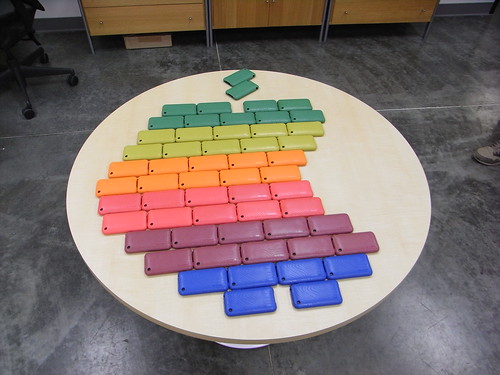
Apple Logo

How clever:


http://www.flickr.com/photos/goincase/3096661724/
0 com

Imagine That

Perhaps the best/most sarcastic get a Mac site ever. Also has a very nice design.

Make sure you click through the whole site and notice all the little things here and there.

http://stillwindows.com/
0 com

WWDC 2009

My theory on the WWDC 2009 is that Steve Jobs will come back just in time to deliver the Keynote, announce Snow Leopard, possably announce the iPhone 3.0 update date, announce some other change or product or upgrade. Then announce he's (either) leaving, or sharing power (Steve and the two or three guys that have been him in his stead).
0 com

My Woodstock...

I'm kind of sad and kind of glad.

I like that there are not many
 MacWorld rumors. But I'm sad when I relized that MacWorld is tomorrow!

I don't like the banners, "A New Era," but I like the banners, "A New Era."

I'm confused and this cartoon sums it up...


0 com

Screenless, Sleeping MacBook Pro?

I had been having a problem with my MacBook Pro. When I opened it, it would come out of sleep without a screen. After time and time again of losing my work to this problem, I noticed a pattern it seemed to be following. When I would plug it in right before I opened the case, it showed no screen. But if I did all that in reverse order it would work!

So now after almost two months of not having the issue, I hereby offer this suggestion for screenless, sleeping MacBook Pros, Open it then plug it in. Just a thought.
0 com

Déjà Vu

I just finished watching Déjà Vu (I loved it.) and I had some questions when I was done.

What happens with the other timelines? The ones he left; The just keep on going without ever knowing if he made it or not. Oh well...

But what about this:
Do you see the Apple logo in the back window?

0 com

TeeWorlds

I just found quite possably one of the most fun multiplayer games I have ever run across.

It was released May 2007 and is on all operating systems (Linux, Mac OS X, Windows and BSD).

The game is incredibly fast, small and usable.
The game is TeeWorlds (renamed from TeeWars).
Oh yea, it's free.

http://www.teewars.com/
http://en.wikipedia.org/wiki/Teewars
0 com

New Use for PicLens

I may or may not have mentioned PicLens before (I'm to lazy busy to look back through more than 100 posts (minuscule, I'm sure); But regardless PicLens is a brilliant way to look at search results. When I search for an image, I generally come up with a couple hundred-thousand results. Looking at them 10 at a time is very time consuming. So I use PicLens instead. I just run the search like normal (on Google Images, Flickr, Youtube, etc.) and click the PicLens icon on the browser window. Bam! I am instantly immersed in my pictures in a very cool format.

See for yourself...

That out of the way, I have now found a new use for it from Technixupdate.com. Open a new tab in FireFox, drag a folder of pictures from your desktop or somewhere, and presto; you can use PicLens to view those pictures too.
0 com

Nano?

I keep reading about the upcoming iPhone announcement and will now voice my own opinions of the topic.

Apple relies on Steve Jobs and innovation; right? I think if they are going to have as big an impact as the original iPhone announcement, they will have a smaller version, 4g instead of 3g all without to much design change, while bringing in an new model with a slightly different design and more colors.

This is probably more of a wish list but I will almost guarantee that it will be thinner. That's just how Apple rolls.
0 com

Quicklook Incomplete Files

I found this out by accident, but if you have an incomplete Quicktime file (from torrents or something) you can push the spacebar and see the random segments that have downloaded. Admittedly, it's a bit hard to watch the movie second by second, but it gives you a way to check the quality and make sure you aren't spending valuable bandwidth just to be Rickrolled.